Unlocking full PC desktop titles natively on standalone VR hardware—such as the Meta Quest 3, Quest 3S, and Pico 4 Ultra—marks one of the biggest leaps forward in spatial computing. WinlatorXR bridges x86/x86_64 Windows code with ARM-based Android architecture inside an OpenXR runtime environment. However, running complex desktop games without a host PC demands precise system configuration.
The core performance of WinlatorXR hinges on your choice of Mesa graphics drivers—specifically Turnip vs. VirGL—combined with optimal DXVK wrappers, Box64 translation presets, and Wine container variables.
This comprehensive driver and configuration guide breaks down the underlying graphics architecture, provides head-to-head driver benchmarks, and delivers field-tested container presets to help you achieve maximum frame rates and low-latency spatial tracking.
Technical Comparison: Turnip vs. VirGL Architecture
Understanding how WinlatorXR processes graphics commands helps isolate performance bottlenecks. Android VR OS runtimes use mobile ARM GPUs, while Windows games communicate via DirectX or desktop OpenGL. Mesa translation drivers act as the bridge between these environments.
┌─────────────────────────────────────────────────────────────┐
│                      Windows Application                    │
│             (DirectX 9 / 11 / 12, OpenGL, Vulkan)           │
└──────────────────────────────┬──────────────────────────────┘
                               │
            ┌──────────────────┴──────────────────┐
            ▼                                     ▼
     DirectX Wrappers                      Native OpenGL
    (DXVK / VKD3D / WineD3D)                      │
            │                                     │
            └──────────────────┬──────────────────┘
                               │
               ┌───────────────┴───────────────┐
               ▼                               ▼
       Mesa Turnip Driver             Mesa VirGL Renderer
    (Native Vulkan 1.3 Driver)     (OpenGL ES Virtualization)
               │                               │
               ▼                               ▼
     Adreno Hardware Access          Android Drivers & OS
    (Low-Overhead Execution)        (Virtual Socket Overhead)
Mesa Turnip Driver (Qualcomm Adreno Vulkan)
Turnip is an open-source Vulkan driver developed within the Mesa ecosystem specifically for Qualcomm Snapdragon Adreno GPUs.
-
Native Vulkan Execution: Turnip bypasses Android’s proprietary graphics stack entirely and talks directly to Adreno hardware.
-
DXVK & VKD3D Acceleration: Because Turnip provides full Vulkan 1.3 features, DirectX 9, 10, 11, and 12 calls converted by DXVK or VKD3D execute with minimal translation overhead.
-
Vulkan Extension Support: Turnip supports advanced extensions like
VK_EXT_transform_feedbackand robust descriptor indexing required by modern PC game engines.
Mesa VirGL Renderer (Virtio GPU Virtualization)
VirGL operates as a virtual GPU renderer. Instead of communicating directly with the hardware Vulkan stack, Wine renders commands into a virtualized Virtio GPU. The virglrenderer engine then translates those commands into standard OpenGL ES calls processed by the host Android OS.
-
Broad Compatibility: Works across non-Adreno chipsets (ARM Mali, Immortalis, PowerVR) that provide basic OpenGL ES 3.x support.
-
High Virtualization Overhead: Commands pass through Unix sockets and shared EGL contexts, creating significant CPU overhead that can cause frame drops in demanding 3D titles.
-
No Direct DXVK Support: Because VirGL targets OpenGL ES, it cannot leverage Vulkan-based DXVK directly without additional layered wrappers like Zink.
Architectural Breakdown: Turnip vs. VirGL vs. Alternative Drivers
| Feature / Capability | Mesa Turnip Driver | Mesa VirGL Renderer | Mesa Zink Driver |
| Primary Target Hardware | Qualcomm Snapdragon (Adreno 6xx/7xx) | Mali, Immortalis, Universal ARM | Non-Adreno Vulkan GPUs |
| Graphics API Base | Native Vulkan 1.3 | OpenGL ES 3.x Translation | OpenGL over Vulkan |
| DirectX 9/11 Wrapper | DXVK (High Efficiency) | WineD3D (OpenGL conversion) | DXVK via dual translation layer |
| System Overhead | Lowest (Direct HW access) | High (Virtual Socket/EGL) | Moderate-High (Double translation) |
| Standalone VR Viability | Essential for Quest 3 / Pico 4 Ultra | Fallback for legacy 2D titles | Niche / Experimental fallback |
Optimal Container Settings in WinlatorXR
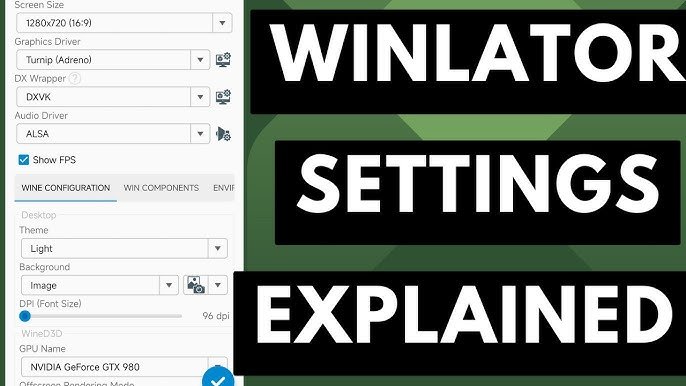
Configuring a container in WinlatorXR requires balancing CPU instruction translation, RAM allocation, and rendering resolution.
Environment Variables for Maximum FPS
Environment variables fine-tune Mesa driver behavior, memory allocation, and swapchain present modes. Insert these key-value pairs into the Environment Variables section of your container settings:
Essential Variables for Turnip Driver
TU_DEBUG=noconform
MESA_VK_WSI_PRESENT_MODE=mailbox
MESA_SHADER_CACHE_DISABLE=false
MESA_SHADER_CACHE_MAX_SIZE=512MB
DXVK_HUD=fps,gpuname
-
TU_DEBUG=noconform: Disables strict Khronos Vulkan conformance checks. This trade-off significantly improves frame times in modern titles. -
MESA_VK_WSI_PRESENT_MODE=mailbox: Queues rendered frames without tearing or locking to display refresh cycles. This helps stabilize head-tracking motion inside OpenXR spaces. -
MESA_SHADER_CACHE_MAX_SIZE=512MB: Increases shader cache disk capacity. Storing compiled shaders reduces stuttering when entering new game regions.
Essential Variables for VirGL Renderer
mesa_glthread=true
MESA_SHADER_CACHE_DISABLE=false
MESA_EXTENSION_MAX_YEAR=2003
-
mesa_glthread=true: Offloads OpenGL command processing to a dedicated worker thread, relieving CPU pressure on the main emulation thread. -
MESA_EXTENSION_MAX_YEAR=2003: Restricts Mesa OpenGL extensions to retro-era features. This fixes crashes in vintage games like Deus Ex or System Shock 2.
Headset-Specific Optimization Presets
Every VR headset features distinct cooling capabilities, resolution displays, and Qualcomm SoC revisions:
Meta Quest 3 & Quest 3S (Snapdragon XR2 Gen 2)
-
Graphics Driver:
Turnip 24.x / 25.x -
DXWrapper:
DXVK 2.4.1orDXVK 1.10.3 -
Box64 Preset:
Performance -
Target Resolution:
1280x720(Native 3D VR Mode) or1600x900(Flat Screen Theater) -
Performance Note: The XR2 Gen 2 chip easily handles DXVK compilation. Keep active cooling clear to prevent thermal throttling during long gaming sessions.
Pico 4 Ultra (Snapdragon XR2 Gen 2)
-
Graphics Driver:
Turnip (Latest Mesa release) -
DXWrapper:
DXVK 2.x -
Box64 Preset:
Performance -
Target Resolution:
1280x720 -
Performance Note: The Pico 4 Ultra features excellent thermal headroom, yielding slightly higher average FPS in Vulkan-heavy titles than the Quest 3.
Meta Quest 2 (Snapdragon XR2 Gen 1)
-
Graphics Driver:
Turnip (Legacy Adreno 6xx) -
DXWrapper:
DXVK 1.10.3(Avoid DXVK 2.x due to higher memory demands) -
Box64 Preset:
CompatibilityorIntermediate -
Target Resolution:
1024x768or1280x720 -
Performance Note: Limit games to DirectX 9 or early DirectX 11 engines (Fallout: New Vegas, Portal 2, Half-Life 2).
Troubleshooting Driver Crashes & Graphical Artifacts
If your game fails to launch or exhibits missing textures, use this troubleshooting tree:
1. Black Screen on Game Startup
-
Primary Cause: Incompatible DXVK wrapper version or missing Vulkan extensions.
-
Resolution: Reopen container settings and change DXWrapper from DXVK to WineD3D (Native). If using Turnip, rollback the driver version to a stable release like
Turnip 23.3.0.
2. Severe Texture Glitches or Missing Polygon Meshes
-
Primary Cause: Shader compilation errors in Turnip or missing vertex extensions.
-
Resolution: Add
TU_DEBUG=noconformto your environment variables. If textures remain corrupted, clear the shader cache inside WinlatorXR’s app settings.
3. Screen Tearing and Tracking Stutter in VR Mode
-
Primary Cause: Frame rate mismatch between the game’s output FPS and the OpenXR headset refresh rate (90Hz/120Hz).
-
Resolution: Set
MESA_VK_WSI_PRESENT_MODE=mailbox. Cap the game’s internal frame rate to 60 FPS or 45 FPS inside game video settings to maintain stable motion vector extrapolation.